Friday, October 29, 2010

Isolated Marble, a work-in-progress

Some time ago I tried to develop a variation of Bram Cohen's Trapped Marble puzzle, which is now being sold by Hanayama Ltd as Cast Marble. I tried to modify the cuts as radically as possible, but the puzzle as a whole behaved just like Cohen's original. It apparently lacked novelty, so I stopped working on it.


The challenge in Bram Cohen's original puzzle was to assemble all four pieces; there was no challenge assembling the two-piece marble without the rest of the puzzle. But in the following months, many people have been confounded by the central 'marble' from my prototype. It just doesn't go together as people expect.


The secret to assembling the marble by itself is to withdraw the parts farther than you might intuitively expect, until they elegantly nest and join together. My four piece prototype had been designed to be assembled from a widely-separated orientation, but I hadn't anticipated the two central 'marble' pieces would retain this behavior without the other two pieces. It turns out to be a satisfying puzzle all by itself!
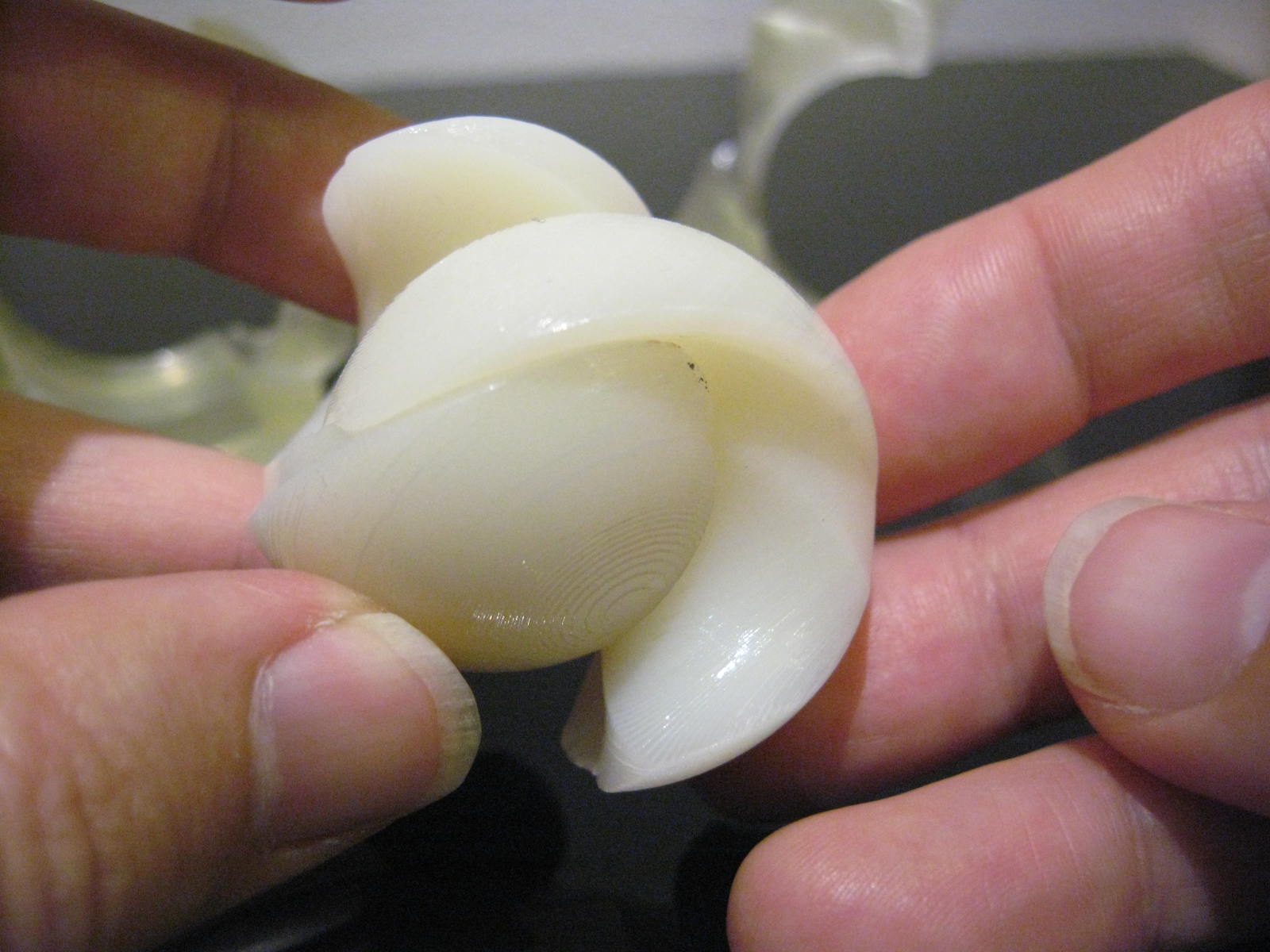

So I've begun exploring designs for a two-piece marble puzzle. To help distinguish each batch of prototypes I briefly installed red PVC for several layers in the middle of the build, which gave these parts a red stripe. For subsequent prototypes I will try swapping-in small amounts of other colors, again to uniquely identify each build.

Thursday, October 21, 2010

Built-in color graphics

This weekend I built some parts with shiny, colorful graphics built-in.


I embossed a thin extrusion of a heart-shape, 0.17mm thick, onto the tops of four parts. For building, I arranged the parts on the table (not as shown) with the embossed graphic parallel to the build platform. (The SD300's build software has a 1-click tool to do that.)


I built most of the model in white material, then switched to red material for the last layer. Hence most of the model was white, but the embossed heart shape was built using red. The excess red material simply peeled away with the supports, leaving the red graphic integrated into the model.


The finished parts have the colorful heart graphic integrated right into the model. Unfortunately, red is the only SD300 material that seems to offer enough contrast for this technique. The "black" material isn't dark in thin sections (but I'm working on a workaround). Solido lists "blue" material for the machine, but dealers don't have any inventory.

Saturday, October 16, 2010

Clearing an X with a probe

It's occasionally handy to have a set of general-purpose probes at hand for cleaning support material from small openings and crevices. They aren't needed for most jobs, but they're invaluable for a few situations.


This model had two blind holes, which I filled with X-shaped peeling cuts. I made sure the cuts didn't touch the walls in order to avoid splitting the material into sections.


After building, the X marks identify the material that needs to be removed from the holes.


It was too awkward to reach inside the holes with the standard tweezers, as there just wasn't enough room to operate the jaws. But the probes are perfect because the thin point can hook under the X. The probe's point is small but not sharp, so the slightly blunted tip doesn't scratch the model.


The X disappeared after the last layer of support material was removed, visually confirming the hole had been cleared completely. When I had used tweezers for similar jobs I'd always scratched or gouged the bottom of the hole; the probe worked much better.

Saturday, October 9, 2010

X Marks the peeling cut

In one of my first posts I suggested running a peeling cut through holes to give the forceps something to grab onto when peeling away the supports. But it's not so good to run a cut through a large hole (or hollow area) because it divides it into two sections, which could take twice as long to peel. It also reduces the size of the Z-folds, so the support material is more likely to tear instead of coming out cleanly.

So I've begun adding an X-shaped peeling cut inside hollow areas, not touching any walls.


At first the X-shaped cuts don't look useful because they don't touch any walls, which goes against the standard convention for peeling cuts. But they conspicuously identify the leftover support material.


The X provides a convenient location to grab the support material without touching any walls, thereby preventing the forceps from scratching the model.


The Z-folds work better because all the sides are clear of peeling cuts. Even if the material tears during peeling, the X provides a safe place to get hold of the remaining layers and begin peeling again.

Wednesday, October 6, 2010

FInally, my second failed build

Ordinarily, the SD300 tests the integrity of the XY cutter at the completion of each layer by using the cutter to separate the model from the material and then attempting to rewind the material onto the source roll. When a cutter is worn out the material remains attached to the model and the machine emits a distinctive noise from an internal clutch.

The machine had a relatively new XY cutter, so I was surprised to hear the slipping-clutch noise which usually indicates a worn out cutter. The machine's log seemed to express the same astonishment, "the cutting knife is new and the previous layer was OK." Evidently the SD300 concluded the XY cutter was too new, so it just tried to continue building the model until I intervened.


Normally the machine can continue to build the same model after the XY cutter is replaced, but inspection revealed this model was full of air bubbles. The glue hadn't been spreading properly so the layers weren't welding together. This model would be defective, even if the rest of it built perfectly.


I ran some tests which confirmed the culprit was the XY knife, not air in the glue system. I've had other knives wear out, but this was the first occasion where it caused any problem with the model being built. Evidently it had scraped the model surface, creating gouges and voids which prevented the glue from spreading between sheets. Everything worked when I replaced this cutter (shown below) with a new one.


Frankly, I'm pleased to have only two failed builds since I bought the machine in February. That compares favorably with colleagues who use V-Flash and Dimension modelers.

Admittedly I've had bad builds for other reasons, such as bad STL designs or improper layouts, but only two builds have been defective. My first defective build was entirely my own fault, as I'd allowed the glue to run out. This one might have been a freak incident.

Wednesday, September 29, 2010

Too thin?

Yesterday I encountered a puzzle designer who'd shared a rough draft of a model with impractical, thin walls. The pictured model is only 19mm high, with many 0.63mm walls and several tapers that were even thinner.

I'd tried to avoid thin walls in my earliest designs for the SD300, but occasionally built thinner walls by chance or miscalculation. Some worked, some didn't, but I always learned something new. So I got permission to build the model, fully aware I was going to have problem with it.


Unsurprisingly, lots of really thin areas broke away while removing the supports. I managed to preserve some walls as thin as 0.5mm by peeling the support material away slowly, one layer at a time. Some undercuts were so narrow I couldn't even reach into them with my curved forceps.


Still, the model emerged sufficiently intact for examination. The channel walls were so thin I could barely get a fingernail inside, and they were noticeably flexible. I dipped the parts in Weld-On 2007, which immensely strengthened the surviving structures.


Surprisingly, the parts can be assembled...barely! The tolerances were inadequate, but they just barely functioned because the channel wall flexes just enough to compensate.


The design doesn't make provision for installing all four parts, so I couldn't assemble the whole puzzle. But it's impressive that it worked at all.


These parts aren't practical due to the overly-tight tolerances, but the model confirms the designer's concept nevertheless. But I certainly wouldn't try to build such thin walls routinely. A comparable model might take 10 minutes to clean away the supports, while this took almost 2 hours. If it hadn't been for the Weld-On dip the parts probably would've broken during testing.

But it shows that the user can venture outside of "good practices" at his discretion. The SD300 will attempt to build any geometry it can process, even if it's not practical. It's the user's choice.

Sunday, September 26, 2010

How to Check glue level

Back in May, I neglected to replace the glue cartridge when replacing the rest of the material kit and ruined a model because the SD300 ran out of glue during the next build. Since then I've tried to always replace the glue cartridge in sync with the PVC roll.

I learned to double-check the glue cartridge's capacity by shining a high-intensity LED flashlight through the side walls, which reveals the glue level as a bright line on the wall.

Today I was startled to discover the glue cartridge was essentially empty, even though there was plenty of PVC left in the material kit. There should've been plenty of glue left. Notice the bright line is all the way at the bottom.


I still had the glue cartridges from two recently-exhausted material kits. There was a little glue left in one of them, but that's how much is usually left over after a kit has been used up. The bright line is near the bottom.


When I checked the other "empty" cartridge the LED light showed it had a lot of glue left in it. Notice how the bright area is well above the bottom!


Probably I got an 'empty' cartridge swapped with a non-empty one when changing between colors recently. I shouldn't leave the empties nearby. It's fortunate I discovered it before the machine completely ran out of glue.

Monday, September 20, 2010

Improved transparency for the Cooksey Tribute puzzle

EDIT: Just to clarify, I only built the transparent rings in the pictures. The brightly-colored maze cylinders were purchased from Oskar's store at Shapeways.

In a previous post I described how I'd made transparent rings for Oskar's Cooksey Tribute maze puzzles. The transparency enhanced the puzzle, but they were only semi-transparent at best.


I had sprayed the previous parts with Weld-On 2007 to improve their transparency, but I soaked a second set in the solvent for 25 seconds and then permitted it to air-dry for an hour. The results were substantially more transparent.


There's some optical distortion where build chatter has been transformed into wavy lenses, but the new part is more transparent.


So now I'm building a new set of enhanced transparent rings using the solvent soak-dip.


I had discovered the value of a solvent dip long ago, but I'd been using a simpler solvent-spray to make it more convenient. The dip requires a relatively large volume of Weld-On 2007 welding solvent, a solvent-resistant surface, gloves, and ample ventilation. But these results are worth some special effort!

There are additional pictures of Oskar's Cooksey Tribute in my PhotoBucket Album.

Thursday, September 16, 2010

Rox shares the Rox Box with Uwe Mèffert

In August I built a gem-filled puzzle for a widely-known puzzle collector, Roxanne, and named it the Rox Box in her honor. It featured two puzzle-engraved gem stones locked behind clear windows, and the box could only be opened by navigating the lid through a maze in the shape of the word "Rox," Roxanne's nickname. I built only one, so she owns a very exclusive specimen.


Recently Roxanne met Uwe Mèffert over dinner in Hong Kong. Mèffert invented the Pyraminx puzzle, which was popular back in the Rubik's Cube puzzle craze in the 1980s. He still develops and sells puzzles at his web store www.mefferts.com

Roxanne showed him her Rox Box puzzle and kindly sent me a picture of Mèffert playing with it. He praised the way it incorporated her name right into the puzzle!


Mèffert showed some of the puzzles he's developing for his store, and Roxanne shared many of the favorites in her own collection. I'm very flattered she included the Rox Box because I interpret her choice as a sincere expression of appreciation. I'm grateful for that!

Tuesday, September 14, 2010

Faking a power outage

Yesterday I noticed the SD300 had mysteriously stopped part way through a build. The computer's status monitor said the SD300 was actively building layer 22, but the SD300's display suggested it was waiting for the computer. Pressing Pause/Resume had no effect.


So I ran the SDView, the SD300 maintenance app, and brought up the machine's log. There were 3 unusual entries that said "Unknown command in file." Had there been a data transmission error between the computer and the SD300? In any case, the log indicated the SD300 hadn't finished layer 21 because it was "waiting for host" to send the last data, but I guess the computer thought layer 21 had been finished and was waiting to send layer 22. Stalemate!


So, how could I resolve this apparent deadlock?

The SD300 has a robust procedure for recovering from power outages, so I pulled the plug for a few minutes to simulate a power outage. That worked!

When I plugged it in again, the SD300 went through its initialization and recognized that it had unfinished model. After verifying the model's integrity the SD300 asked me to confirm that it should resume the model in-progress. Sure enough, it negotiated with the computer to re-load the model data and it resumed building after a 2 minute pause for "Loading."

Friday, September 10, 2010

Using a Pin Vise to clear small holes


For a while I disliked building parts with deep, narrow holes because leftover support material clings tenaciously inside the holes and solidly blocks them. There's common advice to simply clear the holes with a drill, not my favorite solution.

A colleague suggested using an ordinary drill bit in a pin vise. The pin vise allows the bit to be twirled freely, and the handle provides leverage and strength.


Because its a handheld tool, the pin vise gives tactile feedback that makes it easy to guide the bit to follow the intended path of the hole. I found it helps to run a peeling cut down the middle of the hole, which gives the flutes a loose edge to grab onto.


Surprisingly, the manually-operated drill bit clears away leftover material very quickly yet doesn't tend to cut into the model itself. The model is quickly cleaned up by scraping the drill bit against the sidewalls and withdrawing it to clean the flutes.

Thursday, September 2, 2010

George Bell's Exploding Ball

Yesterday designer George Bell emailed me a file for his Exploding Ball puzzle. The pieces have all sorts of awkward angles, so I just took a guess on how to orient it for optimal building on the SD300.

It would take about 7 hours to build all eleven parts, but I chose to build 3 sample parts because it would only take 3 hours so I'd be able to inspect them before bedtime. It was lucky that I'd printed a couple of samples, as I'd arranged the peeling cuts so they put stress on a thin section. I broke one of the pieces when I hastily peeled the supports away. It wouldn't impair the part's usefulness, but it's unsightly. (Clarification: The part on the right is flat where a tiny piece of the curve broke off; the part on the left is intact, showing how the curve should look.)


I fixed the peeling cuts and ran another build overnight. Today I peeled away the supports quickly, easily, without any damage to the parts. When the parts are assembled, they form a ball that's virtually impossible to disassemble because of the smooth surface and bizarre angles. Even if you get your nails in the cracks you can't pull it apart because your touch tends to hold the puzzle together. But it's supposed to disassemble when it's spun, thanks to centrifugal force.


It took me half an hour to assemble the puzzle the first time, so I recorded a video of my first attempt to 'explode' the puzzle because I wasn't sure if I'd get it put together again. It took several tries. It's lucky the finished model is pretty tough, since I dropped it at lot!

Saturday, August 28, 2010

Cooksey Maze

In the 1970s Richard Cooksey invented a cylindrical maze puzzle, which underwent some development by Pentangle Puzzles & Games but didn't ultimately become a commercial product. Puzzle inventor Oskar van Deventer recently adapted the puzzle and made it available through Shapeways as Cooksey Maze.

Oskar also designed a series of six Cooksey Tribute puzzles, each a different variation on the basic concept.


The ring has two pins that ride in the grooves on the cylinder; it's shaped so the user can choose one pin to lift out of the grooves, permitting the user to switch from one side of the 'maze' to the other. The ring is attractively cut with large openings for the user to look through, but the opaque material undesirably blocks the view of the maze. Oskar said he would have preferred to make the rings transparent, so I offered to try building a set on the SD300.


I built a complete set of six rings, corresponding to the six variants of Cooksey Trubute, using the amber-transparent material. The 3-4mm thick sidewalls aren't crystal clear, but they're sufficiently transparent to give a clear view of objects inside.


Sure enough! The transparent rings give a clear enough view to permit the puzzle to be explored and solved pleasantly.


M. Oskar van Deventer is offering a free Cooksey Maze to anyone who can put him into contact with Mr. Richard Cooksey.

Sunday, August 22, 2010

Multi-color build

I've used clear & opaque material in the same build, so now I tried building with two colors in the same build. Part way through this build I replaced the white material kit with black, resulting in a model block that resembles an Oreo cookie.


The finished parts show a nice, distinct transition from one color to the other.


I assembled the parts into a puzzle and added colored tiles. It looks a bit bizarre, but it shows how two colors can be used together.